
ROBOT VACUUM REPAIR · UK SERVICE CENTRE
Robot vacuum repair UK.
Robot vacuum stopped charging, lost its way or stopped cleaning properly?
Tell us the make, model and what happens when you try to use it. Electronic Partners can review your repair enquiry and explain the next steps for assessment at our central UK service centre.
Include any error message and the model of the docking station, if one is involved.
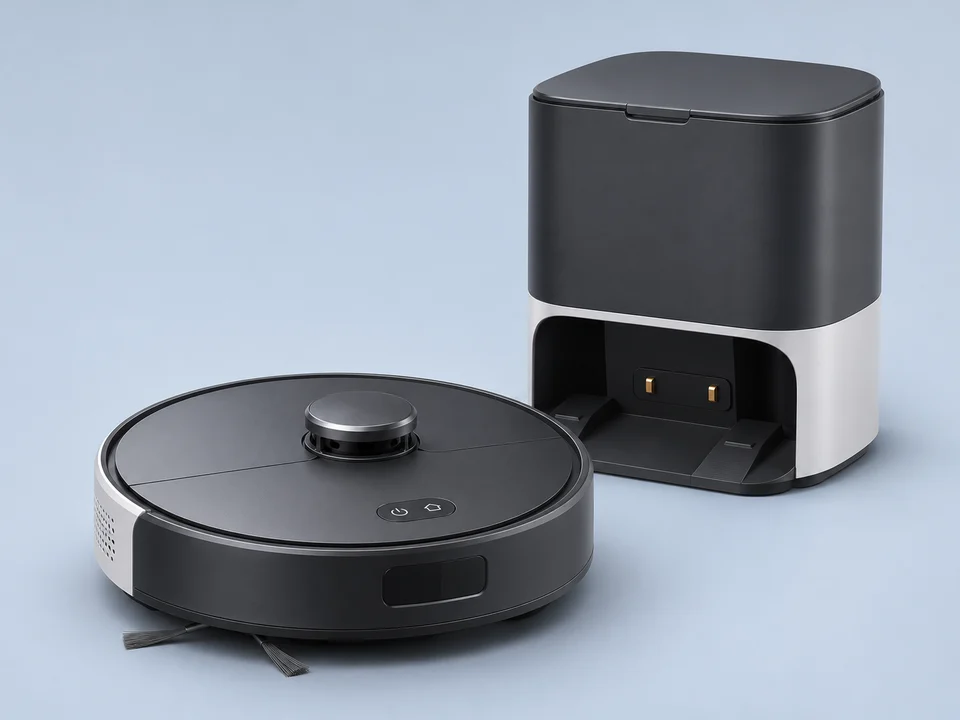
Common faults
Robot vacuum repair services.
Choose the problem closest to what you have noticed. You do not need to diagnose the fault before contacting us.
Power & charging
No response, repeated shutdowns or a robot that will not charge.
Tell us whether the robot reacts on its dock and whether the dock has power. Battery condition, charging contacts, power circuitry and the station can produce similar symptoms. Include any charging alert and describe what happened before the fault began.
Ask about this faultNavigation & sensors
Circling, repeated reversing, sensor errors or difficulty finding the dock.
Include the exact alert and describe whether the problem affects every clean or only a particular room. Contaminated sensors and the home layout can also affect navigation. This information helps distinguish a maintenance or setup issue from a fault needing assessment.
Ask about this faultWheels, brushes & suction
A stopped wheel or brush, unusual noise or poor pickup after routine maintenance.
Tell us which part stops moving and at what point cleaning fails. Accessible blockages, worn consumables, motors and electrical faults can cause different problems. Follow the routine bin, filter and brush checks in your model’s manual before requesting assessment.
Ask about this faultDocks & self-empty stations
Charging, emptying or communication problems involving the station.
The robot, its station or both may be involved. Include both model numbers, any warning lights and whether the problem occurs when docking, charging or emptying. We will confirm which equipment is needed before you arrange delivery.
Ask about this faultMopping & water systems
Mop movement, water-flow errors or leaks on vacuum-and-mop models.
Describe whether the problem happens during cleaning, refilling or mop washing, and where any water appears. The fault may involve the robot, water system or station. Stop using a leaking machine and ask about assessment; water tanks need model-specific preparation before transport.
Ask about this faultError codes & connections
Repeated alerts, failed tasks or a robot that drops out of its app.
Send the error wording or a screenshot, and tell us whether the robot works from its own buttons. Home Wi-Fi, app settings and manufacturer services can affect operation as well as hardware. A workshop repair cannot guarantee to resolve an external network or cloud-service issue.
Ask about this faultRepair acceptance and parts availability depend on your exact model and condition.
Equipment & model examples
Tell us which robot vacuum you have.
We welcome enquiries about iRobot Roomba, Roborock, Eufy, Dreame, Ecovacs, Dyson, Shark and Hoover robot vacuums. These are examples to enquire about; assessment and repair options depend on the exact model, fault, parts access and equipment involved.
iRobot Roomba
Roomba vacuum and Combo models; include the station model where relevant.
Roborock
S and Qrevo series; tell us whether the fault affects the robot or its dock.
Eufy
RoboVac and Omni models, including vacuum-and-mop combinations.
Dreame
Robot vacuum and mop enquiries, with the exact robot and station model numbers.
Ecovacs
Deebot robot vacuums and combination models; include the wording of any alert.
Dyson
360 Eye, 360 Heurist and 360 Vis Nav model enquiries.
Examples help us identify your equipment. Please give the exact model when enquiring. Repair options depend on condition, suitable parts and access for testing. Manufacturer names do not imply authorisation.

Assessment before replacement
The expertise behind your robot vacuum repair.
A robot vacuum combines motors, sensors, charging electronics and software. An error on screen is a starting point for diagnosis, rather than proof that one particular part needs replacing. Our assessment considers the reported symptoms and the checks appropriate to the model.
For faults that need workshop attention, we explain the repair options and provide a quotation after assessment. Replacement modules or component-level work may be appropriate where access, condition and parts allow. Relevant functional checks follow agreed repairs; your home’s layout, Wi-Fi network and manufacturer cloud services cannot all be reproduced at the bench.
If a repair is not worthwhile, we explain why so you can make an informed decision.
Genuine parts where possible or suitable compatible alternatives. Ask about the proposed parts and applicable warranty.
How it works
Four steps. One specialist team.
Know what happens before you send your robot vacuum.
-
Request an estimate
Tell us the robot and dock models, symptoms and any error message. Photos or a description of when the fault occurs can help.
-
Book & send
Once the assessment route is agreed, follow your booking instructions for the items required, preparation, packaging and delivery.
-
Assess & approve
We assess the reported fault, explain the available repair options and provide a quotation for your approval.
-
Test & return
Agreed repairs receive relevant functional checks before return. We explain the result and any points to check when setting up your robot again.
Repair costs
What will my robot vacuum repair cost?
The make, model and fault determine the work required. A stopped brush, charging problem and failed station can have very different causes. Send us the symptoms and any error code so we can review the enquiry before you arrange delivery.
Inspection establishes the repair scope and parts availability. We provide the quotation before agreed repair work begins. Confirm any assessment, return-delivery or other applicable charges when arranging the booking. For an older or lower-cost machine, the price of an equivalent replacement can also help you decide whether to proceed.
Check your quotation and booking terms for applicable diagnosis, service, delivery or return charges. An estimate is not a fixed repair price.
Read our repair terms and warranty information for coverage, exclusions and applicable charges.
Before assessment
Useful details before you enquire.
Identify the equipment
Include the exact robot model and, where relevant, the dock or station model. Clear photographs of the model labels can help if you are unsure.
Record the symptoms
Note the error message and when the problem happens: cleaning, returning to the dock, charging, emptying or mop washing. Tell us whether it occurs every time.
Tell us what you have checked
Follow the accessible maintenance checks in your model’s manual and describe the result. Mention previous repairs or liquid exposure. You do not need to open the machine to make an enquiry.
Preparation & transport
From your home to our repair centre.
Ask about the assessment arrangements before sending your robot vacuum. We will confirm what to include and the delivery options for the agreed items.
Ask about your repair →Send the right equipment
For a docking, charging or mopping issue, tell us about the robot and its station. We may need one or both, depending on the fault. Include only the accessories agreed in your booking.
Empty, clean and protect
Follow your model’s instructions to empty the dustbin and drain applicable water tanks. Remove loose debris and allow removable cleaned parts to dry. Protect the robot and any agreed station against movement and impacts in the box.
Follow the transport instructions
Delivery and collection options depend on your model and parcel. Follow the agreed battery, shutdown and packing instructions. Tell us before arranging transport if a battery is swollen, leaking, hot or physically damaged; do not put a damaged battery into an ordinary parcel.
Before you book
Robot vacuum repair questions.
Repair options, assessment and preparing your robot vacuum.
Can my robot vacuum be repaired?
Many faults can be assessed, but the answer depends on the model, damage and available parts. Tell us the brand, exact model and symptoms. We explain the options after inspection and let you know if a repair is not worthwhile.
How much will the repair cost?
A charging fault, failed wheel and dock problem require different work. Start with an estimate enquiry, including any error code. Assessment establishes the repair scope and quotation. Confirm any inspection or return-delivery charges when arranging the booking; repair work proceeds after approval.
Do I need to send the docking station as well?
Not always. Charging, emptying and mop-washing problems may require the station as well as the robot. Give us both model numbers and describe the lights or alerts you see. Wait for confirmation of what to include before packing.
Do you accept vacuum-and-mop combination models?
You can enquire about these models, including water-flow, mop-drive and station faults. Include the exact robot and station models. We confirm the assessment options before you arrange delivery. Drain tanks using the manufacturer’s instructions and do not send a machine containing water.
What should I try before requesting a repair?
Check the manufacturer’s guidance for your model, including accessible filters, brushes, bins and sensors. A blockage or missed maintenance step can resemble a failed part. Note the error message before changing settings. You do not need to open the machine or attempt electrical repairs to make an enquiry.
Can you fix mapping, app or Wi-Fi problems?
Send the exact symptoms and say whether the robot still works from its own buttons. Navigation hardware can fail, but home Wi-Fi, app settings and manufacturer services can also affect operation. We can review the enquiry; a workshop repair cannot guarantee to resolve every account, network or cloud-service problem.
How should I prepare the robot for delivery?
Wait for your booking instructions. Empty dirt and water containers following your model’s manual, remove loose debris and let removable cleaned parts dry. Use the specified shutdown or shipping mode and secure each agreed item in protective packaging. Tell us about battery damage before arranging transport. Do not factory-reset or unlink the robot unless this is specifically agreed, and never send account passwords.
Should I contact the manufacturer if it is under warranty?
Check your warranty options before authorising an independent repair. If assessment charges apply, tell us about previous repairs and the current symptoms so we can explain the next steps. A repair enquiry does not make Electronic Partners the manufacturer’s authorised warranty agent.
Customer reviews
Reviews across our repair services.
Customer reviews of Electronic Partners across our repair services.
Ask our team
Not sure where to start?
Need help identifying the model or describing the fault? Ask our team before arranging delivery. Include the robot and station details where relevant, and never send account passwords.
Managing repairs for a business? Explore business & trade repair services →